
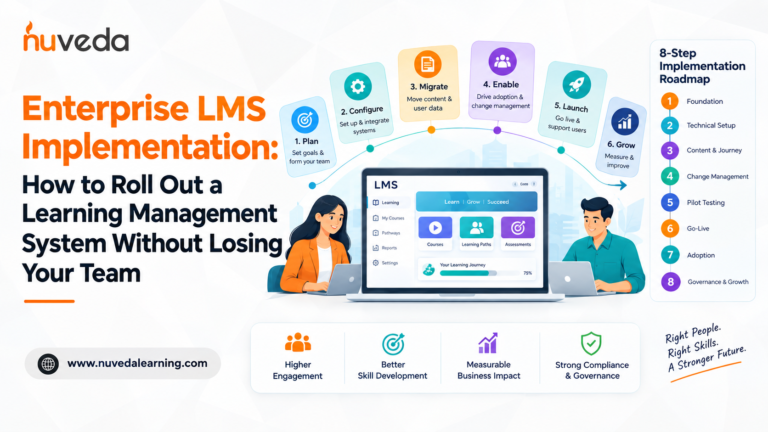
Enterprise LMS Implementation: How to Roll Out a Learning Management System Without Losing Your Team
Signing an Enterprise LMS contract is the easy part. Getting thousands of employees across departments, regions, and business units to actually use the platform is where most enterprise LMS implementations become challenging.
An Enterprise LMS implementation is fundamentally different from deploying a learning platform for a small team or a single department. Enterprise organisations typically have complex HR systems, multiple user groups, different learning requirements, large volumes of historical training data, multiple locations, regulatory obligations, and a wide range of stakeholders.
That means an Enterprise LMS installation requires much more than technical configuration. It requires structured planning, data migration, systems integration, governance, change management, user adoption, and ongoing support.
Over 58% of organisations in a Brandon Hall survey said they were looking to replace their LMS, and in many cases, it was not their first LMS. More than half of organisations that bought an LMS were already planning to buy another one.
The issue is not necessarily that LMS technology does not work. Enterprise LMS implementations can fail because organisations underestimate the operational, governance, technical, and change management complexity involved.
An Enterprise LMS rollout is, at its core, a change management exercise. It asks employees to change how they access training, track development, complete compliance requirements, and engage with their professional growth.
The technology is only one part of the implementation. The people, processes, data, integrations, and governance are equally important.
This guide provides a complete Enterprise LMS implementation roadmap, covering eight phases from contract signature through the 90-day performance review. It also covers common implementation failures, technical requirements, change management, pilot testing, industry considerations, governance, and post-launch adoption.
Table of Contents
- What Is an Enterprise LMS Implementation?
- Why Enterprise LMS Implementations Fail
- Phase 1: Foundation and Success Planning
- Phase 2: Technical Setup
- Phase 3: Content Migration and Journey Configuration
- Phase 4: Stakeholder Buy-In and Change Management
- Phase 5: Pilot Testing
- Phase 6: Go-Live
- Phase 7: Post-Launch Adoption
- Phase 8: Governance and Continuous Improvement
- Implementation by Industry
- How CALF Handles Enterprise LMS Implementation
- Frequently Asked Questions
- The Bottom Line
What Is an Enterprise LMS Implementation?
An Enterprise LMS implementation is the process of deploying a learning management system across a large organisation with complex users, systems, learning programmes, and business requirements.
Unlike a simple LMS deployment, an Enterprise LMS installation may need to support:
- Thousands or tens of thousands of employees
- Multiple departments and business units
- Multiple countries or regions
- Complex organisational structures
- HRMS or HRIS integrations
- Single sign-on
- Automated user provisioning and deprovisioning
- Large-scale historical training data migration
- Mandatory compliance training
- Role-based learning paths
- Manager dashboards
- Instructor-led and self-paced learning
- Multiple administrator roles
- Detailed reporting and audit requirements
- Ongoing governance and platform management
For this reason, an Enterprise LMS implementation should be treated as a strategic business transformation project rather than simply a software installation.
Why Enterprise LMS Implementations Fail
Understanding common failure patterns before starting an Enterprise LMS installation is one of the most effective ways to reduce implementation risk.
Failure 1: No Clear Definition of Enterprise LMS Success
Start every Enterprise LMS implementation by translating organisational goals into three to four measurable KPIs.
Many enterprise implementations begin with a vague objective such as "move our training to the new LMS."
That is not enough.
Before configuring the platform, define what success looks like at 30, 90, and 180 days.
Ask:
- What does successful adoption look like after 30 days?
- What percentage of employees should complete their first learning activity?
- What percentage of managers should use their dashboards?
- What business metric should the Enterprise LMS influence?
- How will learning effectiveness be measured?
- What level of Kirkpatrick measurement will be applied?
Without measurable success criteria, it becomes difficult to determine whether an Enterprise LMS implementation has actually delivered business value.
Failure 2: Treating Enterprise LMS Implementation as a Technology Project
A technical project plan covering configuration, data migration, integrations, and go-live is not enough for an Enterprise LMS installation.
Large organisations need a structured change management programme alongside the technology implementation.
Without this, employees may not understand why the organisation has introduced the new platform, managers may not reinforce its use, and adoption can decline after launch.
An Enterprise LMS implementation should therefore include:
- Stakeholder communication
- Executive sponsorship
- Manager enablement
- Employee communication
- Adoption planning
- Training and support
- Post-launch monitoring
The objective is not simply to launch the Enterprise LMS.
The objective is to make sure employees actually use it.
Failure 3: Recreating Broken Processes Inside the Enterprise LMS
Many organisations use a new LMS to replicate old manual processes.
This can result in:
- Over-customisation
- Complicated workflows
- Spreadsheet dependency
- Manual administration
- Difficult maintenance
- Lack of standardisation
An Enterprise LMS implementation provides an opportunity to review and standardise existing training processes.
Instead of asking how the old process can be recreated inside the new system, ask whether the old process should exist at all.
Failure 4: Rushed Enterprise LMS Data Migration
Training history is not simply data.
For many enterprise organisations, it is compliance evidence.
A poorly executed data migration can result in:
- Missing training records
- Incorrect completion dates
- Inconsistent certification histories
- Incorrect enrolments
- Reporting problems
- Reduced confidence during audits
For organisations in regulated industries such as healthcare, pharmaceuticals, financial services, and food manufacturing, this can create significant operational and compliance concerns.
Historical training data should therefore receive dedicated planning, resources, testing, and validation during an Enterprise LMS installation.
Failure 5: Launching the Enterprise LMS Too Quickly
A big-bang rollout deploys the Enterprise LMS to every user simultaneously.
For a large organisation, this can create a significant support burden.
Thousands of employees may encounter issues at the same time, including login problems, incorrect enrolments, missing content, navigation questions, and reporting issues.
A phased Enterprise LMS rollout can allow organisations to identify and resolve problems before expanding the platform to additional departments, regions, or user groups.
Failure 6: No Post-Launch Enterprise LMS Support Plan
Enterprise LMS implementation does not end on launch day.
Without structured post-launch support, usage can decline, administrators can become overwhelmed, and the platform can gradually become a compliance checkbox instead of a strategic learning system.
The Enterprise LMS project plan should therefore include a 30-60-90-day adoption programme before go-live.
Phase 1: Enterprise LMS Foundation and Success Planning
Timeline: Weeks 1 to 2
Everything that follows depends on what is established during this phase.
Do not begin Enterprise LMS configuration until the organisation has agreed on its goals, stakeholders, requirements, and success measures.
Define Enterprise LMS Success Metrics
Set four categories of success metrics.
Adoption Metrics
Measure:
- Percentage of employees who complete their first learning activity within 30 days
- Percentage of managers who log in and review their team's learning dashboard
- Percentage of users successfully accessing the platform
Engagement Metrics
Measure:
- Average modules completed per active learner
- Voluntary learning activity
- Programme completion rates
- Active learner rates at 60 and 90 days
Behaviour Metrics
These align with Kirkpatrick Level 3.
Measure:
- Learning Action Plan completion
- Manager observation data
- 360-degree feedback
- Application of trained behaviours
Business Metrics
These align with Kirkpatrick Level 4.
Depending on the organisation, these could include:
- Compliance incident rate
- Time-to-productivity
- Sales conversion
- Employee attrition
- Other business indicators connected to learning programmes
Assemble the Enterprise LMS Implementation Team
An Enterprise LMS installation requires clearly defined ownership across multiple functions.
L&D Lead
Owns:
- Learning journey design
- Content structure
- Programme configuration
- Learning objectives
IT or Systems Lead
Owns:
- HRMS integration
- SSO
- Data migration
- Technical support
- Security requirements
Change Management Lead
Owns:
- Stakeholder communication
- Manager enablement
- Employee communication
- Adoption strategy
Project Manager
Owns:
- Timeline
- Risk register
- Vendor coordination
- Milestones
- Dependencies
- Implementation governance
A dedicated project manager is particularly important for an Enterprise LMS implementation because the project involves multiple departments, systems, vendors, managers, administrators, and employee groups.
Map the Enterprise Learning Ecosystem
Before configuring the Enterprise LMS, document the current learning environment.
Review:
- Existing learning content
- Mandatory and optional programmes
- Compliance requirements
- Existing LMS or training systems
- HRMS data
- Organisational structures
- User roles
- Reporting requirements
- Current training processes
This process can identify potential implementation issues before they become expensive problems.
Phase 2: Enterprise LMS Technical Setup
Timeline: Weeks 2 to 4
Technical configuration is one of the most important parts of an Enterprise LMS installation.
The larger the organisation, the more important integrations, identity management, data quality, and automation become.
HRMS Integration
The HRMS should act as the primary source of truth for employee information.
When a new employee joins, their LMS account should be created automatically.
When an employee leaves, access should be removed automatically.
When an employee changes roles, their learning requirements should update accordingly.
Before go-live, confirm:
- How frequently the HRMS synchronises with the LMS
- What happens when employees change roles
- How reporting lines are updated
- How automatic enrolment works
- How employee deprovisioning works
- Who receives notifications about data errors
A properly configured HRMS integration can significantly reduce manual Enterprise LMS administration.
Single Sign-On
Enterprise organisations often operate multiple business systems.
Employees may already use separate platforms for HR, payroll, communication, finance, productivity, and other business functions.
Single sign-on allows users to access the Enterprise LMS using existing organisational credentials.
This can reduce login friction and simplify access management.
Test SSO thoroughly before Enterprise LMS go-live across all relevant identity providers and user groups.
Enterprise LMS Data Migration
Data migration has two primary components.
User Data
This can include:
- Employee names
- Roles
- Departments
- Locations
- Reporting lines
- Start dates
- Employment status
Historical Training Records
This may include:
- Course completions
- Assessment results
- Certifications
- Expiry dates
- Previous learning activity
- Compliance records
Historical training records require particular attention in an Enterprise LMS implementation because they may be used for compliance, reporting, audits, and employee development.
Test migration with a representative sample before migrating the full dataset.
Phase 3: Enterprise LMS Content Migration and Learning Journey Configuration
Timeline: Weeks 3 to 5
Conduct an Enterprise Content Audit
Do not migrate every piece of legacy content into the new Enterprise LMS without reviewing it.
For every piece of content, ask:
- Is the content still accurate?
- Is it still relevant to the organisation?
- Is it suitable for the way employees will access the Enterprise LMS?
- Is it aligned with a current learning objective?
- Does it need to be updated or retired?
The objective should be to create a useful launch library rather than simply transferring a legacy content library from one system to another.
Configure Enterprise Learning Journeys
Before loading individual courses, establish the learning journey architecture.
Define how:
- Courses
- Assessments
- Learning Action Plans
- Instructor-led training
- Reinforcement activities
- Certifications
fit together for each employee role.
An Enterprise LMS learning journey should provide a structured experience rather than functioning as a simple course catalogue.
Start with the core learning journeys required for the initial rollout.
Additional journeys can be added through a controlled post-launch process.
Create Enterprise LMS Administrator Documentation
Document configuration decisions throughout the implementation.
Record:
- Role structures
- Permissions
- Enrolment rules
- Content requirements
- Assessment rules
- Certification processes
- Expiry workflows
This documentation supports long-term Enterprise LMS governance and protects against the loss of institutional knowledge when administrators change.
Phase 4: Enterprise LMS Stakeholder Buy-In and Change Management
Timeline: Weeks 3 to 6
Change management should run alongside technical Enterprise LMS implementation.
It should not be left until launch week.
Start With Managers
Managers play an important role in Enterprise LMS adoption.
Employees are more likely to understand the importance of a new learning platform when managers actively support and reference it.
Run a manager briefing at least three weeks before Enterprise LMS go-live.
Cover:
- Why the organisation selected the platform
- What managers will see
- How manager dashboards work
- What managers need to do during the first 30 days
- How to answer employee questions
Provide a simple manager reference guide after the session.
Create a Three-Layer Enterprise LMS Communication Plan
Executive Sponsors
Communicate three to four weeks before launch.
Explain:
- Why the Enterprise LMS is being introduced
- What success looks like
- What leaders should communicate to their teams
Line Managers
Communicate two to three weeks before launch.
Provide:
- Platform walkthrough
- Dashboard information
- First-week expectations
- Common employee questions
- Practical talking points
Employees
Communicate one week before launch and again on launch day.
Explain:
- What is changing
- Why the change matters
- What employees need to do first
Explain the Personal Benefit
Employees will naturally ask:
"Why should I use the new Enterprise LMS?"
The communication should answer this question directly.
Instead of focusing only on the organisation's technology investment, explain what employees will be able to do through the Enterprise LMS that they could not do previously.
Phase 5: Enterprise LMS Pilot Testing
Timeline: Weeks 5 to 7
A pilot allows an organisation to test the Enterprise LMS with real users before expanding deployment.
Choose the Pilot Cohort
The pilot group should:
- Represent a complex use case
- Include real target users
- Provide honest feedback
- Represent different roles where appropriate
- Include users who are likely to identify practical adoption problems
Do not rely only on L&D or HR employees for Enterprise LMS testing.
Use Role-Based Pilot Tasks
Give pilot users specific tasks.
For example:
- Log in
- Find their assigned learning path
- Complete the first module
- Submit a Learning Action Plan
- Access their development dashboard
Record where users experience confusion or delays.
Do not proceed with Enterprise LMS go-live while critical issues prevent users from completing core tasks.
Respond to Feedback Quickly
Collect feedback throughout the pilot.
Categorise issues by severity and communicate what has been fixed.
This helps improve the Enterprise LMS before broader deployment and can create internal advocates for the platform.
Phase 6: Enterprise LMS Go-Live
Timeline: Weeks 7 to 8
Choose the Enterprise LMS Rollout Model
Phased Enterprise LMS Rollout
Deploy the Enterprise LMS by:
- Department
- Region
- Business unit
- Role group
This allows the organisation to learn from each rollout wave.
Big-Bang Enterprise LMS Rollout
A simultaneous rollout may be appropriate when:
- The implementation is relatively simple
- The user base is uniform
- There are limited learning requirements
- Regulatory requirements require simultaneous deployment
For complex enterprise environments, rollout planning should take organisational complexity, support capacity, user diversity, and compliance requirements into account.
Prepare Enterprise LMS Day-One Support
Prepare:
- Frequently asked questions
- Dedicated support channels
- IT escalation processes
- Vendor escalation processes
- Manager communication
- Login instructions
- Course navigation guidance
Launch support should be ready before employees receive access.
Set a 30-Day Enterprise LMS First-Action Target
Choose one important action every new user should complete within their first 30 days.
Examples include:
- Complete the role induction pathway
- Confirm compliance training assignments
- Complete the first mandatory course
- Access the development dashboard
Track the target and intervene when adoption falls below expectations.
Phase 7: Enterprise LMS Post-Launch Adoption
Timeline: Weeks 8 to 20
Enterprise LMS implementation does not end when the platform goes live.
The first 90 days are critical for establishing long-term usage.
Days 1 to 30: Monitor and Respond
Monitor:
- Daily active users
- First-module completion
- Support tickets
- Login problems
- Course discovery issues
- Enrolment issues
Support tickets can reveal specific Enterprise LMS problems.
For example:
"I cannot log in" may indicate an SSO issue.
"I cannot find my course" may indicate navigation or content architecture problems.
"I do not know why I have been enrolled" may indicate a communication problem.
Act on these signals rather than waiting for a formal review.
Days 31 to 60: Maintain Enterprise LMS Momentum
During this period:
- Highlight new content
- Run manager pulse surveys
- Identify adoption barriers
- Recognise active learners
- Share useful Enterprise LMS features
- Provide additional manager support
Days 61 to 90: Evaluate Enterprise LMS Performance
At 90 days, compare actual results with the targets established during Phase 1.
Review:
- Active user rate
- Learning activity
- Learning Action Plan completion
- Manager engagement
- Behavioural outcomes
- Business metrics
- Remaining adoption barriers
Use specific data when reporting Enterprise LMS performance to leadership.
Phase 8: Enterprise LMS Governance and Continuous Improvement
Timeline: Ongoing from Week 8
An Enterprise LMS requires ongoing governance after implementation.
Without governance, content becomes outdated, configuration becomes inconsistent, and administrative knowledge can be lost.
Establish Enterprise LMS Governance
Governance should include:
Content Review
Assign review dates to learning content.
Content should be updated or retired when required.
New Programme Intake
Create a standard process for introducing new learning programmes.
Platform Updates
Assign ownership for reviewing vendor updates and their impact on the Enterprise LMS configuration.
Reporting
Establish regular reporting for:
- L&D leadership
- Business stakeholders
- Senior executives
Reports should include metrics, trends, issues, and recommended actions.
Build a Continuous Improvement Process
Use Enterprise LMS analytics to identify which programmes are producing strong learning outcomes.
Review what is working and apply those insights to programmes that are underperforming.
This transforms the Enterprise LMS from a basic training platform into a source of learning intelligence.
Enterprise LMS Implementation by Industry
Enterprise LMS requirements vary significantly by industry.
Enterprise LMS for Healthcare
Healthcare organisations often have complex role structures and strict training requirements.
Clinical certification and competency records may serve as compliance evidence.
An Enterprise LMS for healthcare should therefore support:
- Role-based learning
- Certification tracking
- Expiry notifications
- Re-enrolment workflows
- Historical training records
- Detailed reporting
Map mandatory training requirements for every relevant role before configuring learning pathways.
Enterprise LMS for Retail
Retail organisations often have:
- Large employee populations
- High employee turnover
- Multiple locations
- Distributed workforces
- Mobile learning requirements
An Enterprise LMS for retail should support efficient onboarding and automated role-based enrolment.
Test mobile access and offline functionality in real store environments rather than relying only on corporate office testing.
Enterprise Compliance Training LMS
For regulated industries such as BFSI, pharmaceuticals, and food manufacturing, the Enterprise LMS audit trail is critical.
The system should record:
- Course completions
- Assessment attempts
- Certification issues
- Certification expiry
- Training history
Before go-live, generate and review a test audit report.
The report should provide the evidence required for relevant internal or regulatory reviews.
Enterprise LMS for Training Companies
Training companies managing multiple clients need an Enterprise LMS architecture that supports multiple client environments and administrator roles.
Key priorities include:
- Client permissions
- Administrator roles
- Repeatable client setup
- Client onboarding
- Administrator training
- Standardised configuration
Build and test one client environment completely before replicating the configuration.
How CALF Handles Enterprise LMS Implementation
NuVeda's CALF implementation approach is structured around an eight-week timeline from contract signature to go-live.
The approach is designed for organisations that require a structured Enterprise LMS implementation covering technical configuration, learning journeys, data migration, pilot testing, change management, and post-launch adoption.
CALF has been implemented across more than 50 organisations in healthcare, financial services, retail, professional training, and non-profit sectors.
The Eight-Week CALF Enterprise LMS Implementation Structure
Weeks 1 to 2: Discovery and Foundation
- Kickoff with L&D, IT, and project leads
- Document the learning ecosystem
- Map roles to pathways
- Define integration requirements
- Agree on success metrics
- Establish go-live criteria
Weeks 2 to 4: Technical Configuration
- HRMS integration
- SSO configuration
- Administrator accounts
- Permission hierarchy
- Historical data migration
Weeks 3 to 5: Content and Journey Configuration
- Launch-pack content migration
- Learning journey configuration
- Self-paced learning
- Instructor-led learning
- Flexible learning journeys
- Learning Action Plan templates
- Manager dashboard configuration
Weeks 5 to 6: Enterprise LMS Pilot
- Representative user cohort
- Role-based task scripts
- Feedback collection
- Issue triage
- Configuration improvements
Week 7: Change Management and Communication
- Manager briefing
- Stakeholder communication
- FAQ
- Support channel
- Escalation process
Week 8: Enterprise LMS Go-Live
The Enterprise LMS can be deployed by department, region, or role cohort unless a simultaneous rollout is specifically required.
Day-one support remains available to address issues quickly.
Weeks 8 to 20: Enterprise LMS Post-Launch Support
Post-launch support includes:
- Dedicated customer success support
- Monthly usage reviews
- Adoption monitoring
- Kirkpatrick Level 3 measurement
- Ongoing implementation support
The CALF Enterprise LMS implementation model is designed to support organisations through both the technical deployment and the adoption period that follows.
Frequently Asked Questions About Enterprise LMS Implementation
How Long Does an Enterprise LMS Implementation Take?
A well-structured Enterprise LMS implementation for a mid-market organisation with 200 to 1,000 users typically takes six to twelve weeks from contract signature to go-live.
Enterprise deployments involving complex HRMS integrations, multiple countries, multiple business units, extensive historical data migration, or complex learning requirements can take longer.
The implementation timeline should be based on the complexity of the organisation rather than an arbitrary launch date.
What Is the Biggest Risk in an Enterprise LMS Implementation?
One of the biggest risks is treating an Enterprise LMS implementation as a technology project instead of a business and change management project.
A technically configured LMS can still struggle with adoption if employees do not understand the platform, managers do not support it, and stakeholders are not aligned.
How Do I Get Manager Buy-In for an Enterprise LMS?
Run a dedicated manager briefing three to four weeks before go-live.
Show managers:
- Their dashboard
- Their responsibilities
- How to support their teams
- What employees will experience
- How Enterprise LMS usage connects to organisational objectives
Provide a simple reference guide they can use after the briefing.
Should an Enterprise LMS Use a Big-Bang or Phased Rollout?
The appropriate rollout depends on organisational complexity.
A phased rollout can allow large organisations to test the platform, support users in manageable groups, identify issues, and apply lessons to later rollout waves.
A simultaneous rollout may be appropriate for simpler implementations or situations where organisational or regulatory requirements require everyone to move at the same time.
What Data Needs to Be Migrated During an Enterprise LMS Implementation?
There are two primary categories.
User Data
This can include:
- Names
- Roles
- Locations
- Reporting lines
- Employment status
- Start dates
Historical Training Data
This can include:
- Course completions
- Assessment results
- Certifications
- Expiry dates
- Compliance records
- Previous learning activity
Historical training records require careful validation because they may support compliance and audit requirements.
How Do You Measure Enterprise LMS Implementation Success?
Measure success across four areas:
Adoption
Are users accessing the Enterprise LMS and completing their first learning activities?
Engagement
Are employees continuing to use the platform after launch?
Behaviour
Are employees applying what they have learned?
Business Outcomes
Are the business metrics connected to learning beginning to change?
Enterprise LMS success should not be measured only by course completion rates.
What Is Enterprise LMS Change Management?
Enterprise LMS change management is the structured process of helping employees, managers, leaders, and other stakeholders transition to the new learning platform.
It includes:
- Executive communication
- Manager engagement
- Employee communication
- User enablement
- Adoption monitoring
- Post-launch support
The objective is to make sure the Enterprise LMS becomes part of the organisation's normal learning and development processes rather than simply becoming another software platform.
The Bottom Line
An Enterprise LMS implementation does not end on go-live day.
The contract, configuration, integrations, data migration, testing, and launch are only the foundation.
The real value comes from adoption.
Employees need to use the Enterprise LMS, complete learning programmes, apply what they learn, and connect their development to measurable business outcomes.
For enterprise organisations, successful LMS implementation requires more than technology.
It requires:
- Clear objectives
- Strong project ownership
- Reliable integrations
- Accurate data migration
- Structured learning journeys
- Manager engagement
- Change management
- Pilot testing
- Phased rollout where appropriate
- Post-launch support
- Ongoing governance
Treating the Enterprise LMS as a strategic organisational implementation rather than simply a software deployment creates a structured foundation for long-term adoption and continuous improvement.
Ready to See How CALF's Enterprise LMS Implementation Model Works?
Book a free 30-minute demo to explore the Enterprise LMS implementation timeline, technical requirements, learning journey configuration, and adoption support structure before you sign anything.